Twenty people in the office have Microsoft 365.
Eighty people on the shop floor have… a shared login on the canteen PC. Or a WhatsApp group. Or nothing at all.
So when the production manager needs to share a new safety procedure, it gets printed and pinned to a noticeboard. When someone needs to book holiday, it’s a paper form. And when a supervisor leaves, nobody is quite sure which shared passwords they knew.
Why Shop-Floor Staff Often Get Left Out
Giving everyone a full Microsoft 365 licence can feel expensive for people who don’t sit at a desk. So many manufacturers do one of two things:
- Shared accounts, where several people use the same login
- No accounts at all, with information passed on by paper, phone or personal apps
Both cause problems. Shared accounts mean you can’t tell who did what, and passwords spread. No accounts means important information lives in personal WhatsApp groups that the business doesn’t control.
What Are Microsoft 365 Frontline Licences?
Microsoft makes lower-cost plans designed for “frontline” workers: people who mainly work away from a desk, in roles like production, warehousing and delivery. There are two main options:
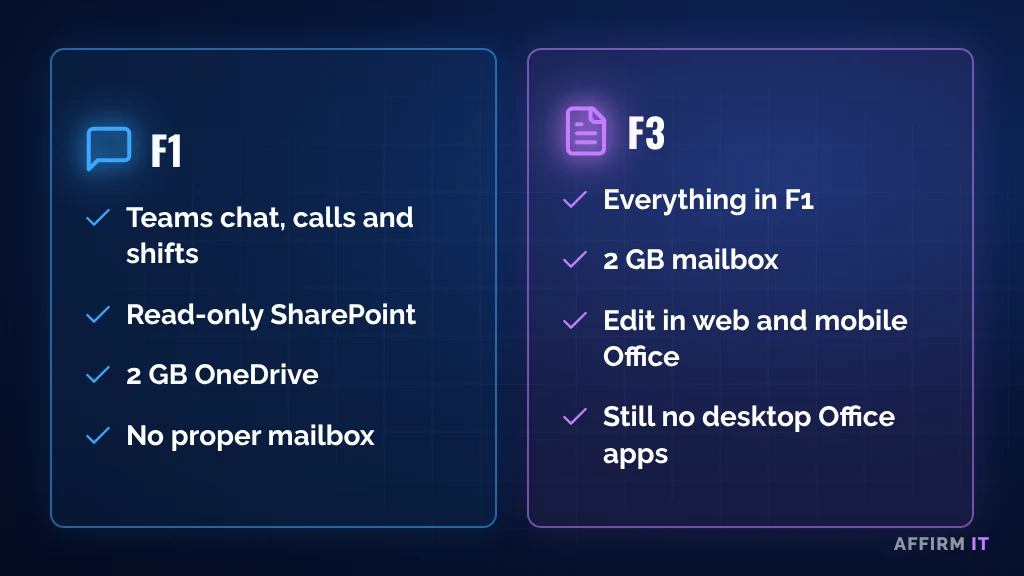
- F1: Teams for chat, calls and shift communication, read-only access to SharePoint, and 2 GB of OneDrive. No proper mailbox.
- F3: everything in F1, plus a small 2 GB mailbox and the ability to edit documents in the web and mobile versions of Word, Excel and PowerPoint.
Neither includes the desktop Office apps. That’s the point: shop-floor staff rarely need them.
What This Means in Practice
- Every person has their own login, so you know who did what
- Supervisors can share rotas, procedures and updates in Teams
- Staff can see policies and documents on their phone or a shared screen
- When someone leaves, you switch off one account, not change a shared password
Things to Check First
- Eligibility: Microsoft has rules about who counts as a frontline worker, so check before switching anyone over
- Devices: will staff use their own phones, shared tablets or a kiosk PC?
- Security: every account still needs multi-factor authentication (MFA)
- Personal phones: decide what company data can be accessed on them, and how it’s protected
Read more about why MFA matters in Why a Password Alone Is No Longer Enough.
Frequently Asked Questions
Can frontline staff use Teams on their own phones?
Yes. Teams works on personal phones, but you should set rules so company data stays protected and can be removed when someone leaves.
Do frontline licences include email?
F3 includes a small mailbox. F1 does not include a proper mailbox.
Need Help?
At Affirm IT, we start with simple questions:
- How do you communicate with your production staff today?
- Are any logins shared between several people?
- What happens to company information when someone leaves?
Not sure how your setup compares? Take our free 2-minute IT scorecard, or work out what downtime costs you with our downtime cost calculator.
Or get in touch with us. At Affirm IT, we provide IT support for manufacturers and managed IT support in Derbyshire and across the East Midlands.