
If your Wi-Fi is unreliable, your team isn’t just annoyed — they’re slower. Dropped Teams calls. Systems lagging. Warehouse scanners not syncing. Staff moving rooms just to get signal. Most business owners assume this is an internet problem. In reality, it almost never is.
Most office Wi-Fi problems are caused by one of four issues: poor access point placement, too few access points, outdated hardware, or incorrect network design. For businesses with more than 10 employees, upgrading to a properly designed business-grade Wi-Fi network can improve connection reliability by over 90%.
This isn’t an isolated problem. Research shows that 49% of senior business decision-makers say poor Wi-Fi coverage inside their premises limits the value they get from their broadband connection—even though 50% already have access to full-fibre internet.
In most cases, the internet connection itself isn’t the problem. It’s the wireless network that’s supposed to deliver it around the building.
| Problem | What it usually means | Practical fix |
| Router in a cupboard | Wi-Fi is poor around the office | Install access points where people actually work |
| Mismatched access points | No Roaming and different passwords | Use a managed wireless system |
| Good signal but slow performance | Too many devices competing | Plan for capacity, not just coverage |
| Forgotten access points | Old firmware and security risk | Monitor and update regularly |
The Broadband Router Trap
Your Wi-Fi probably starts in completely the wrong place.
Why?
Because your router is installed where the internet comes into the building — not where your team actually works.
This usually means:
- A comms cabinet
- Under a desk
- A cupboard
- A corner of the office
So your entire business Wi-Fi is trying to spread out from the worst possible location. If you did that with music, it would sound terrible. Wi-Fi works the same way.

Access Points: The Right Tool Used the Wrong Way
Many businesses recognise this and install wireless access points. That’s a step in the right direction, but we often see them installed badly.
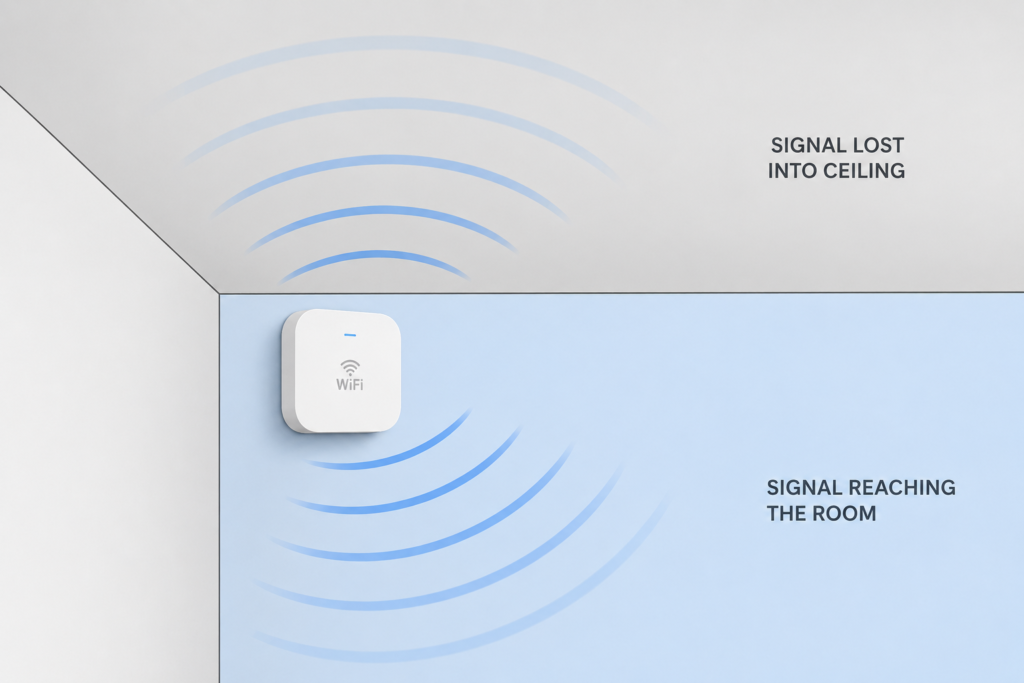
Most business-grade access points are designed for ceiling mounting, where they can broadcast signal downwards and evenly across the space.
- Mounted on walls when designed for ceilings
- Left on top of filing cabinets
- Hidden above ceiling tiles
- Installed wherever there happens to be a power socket
It’s Not Just Coverage, It’s Capacity
Even if your Wi-Fi “reaches everywhere”, it still might not cope. Because your network isn’t just supporting a few laptops anymore.
- Laptops
- Mobile phones
- Tablets
- Printers
- VoIP handsets
- Stock scanners
- Smart devices
All trying to work at the same time.
So what you get is not a full outage.
You get something worse.
Everything just feels slow.
The Problem with Add-As-You-Go Wi-Fi
A lot of businesses try to fix Wi-Fi by just adding more kit over time.
Another access point. Something bought online, or an old one from a shop that closed down.
It works… sort of. But behind the scenes:
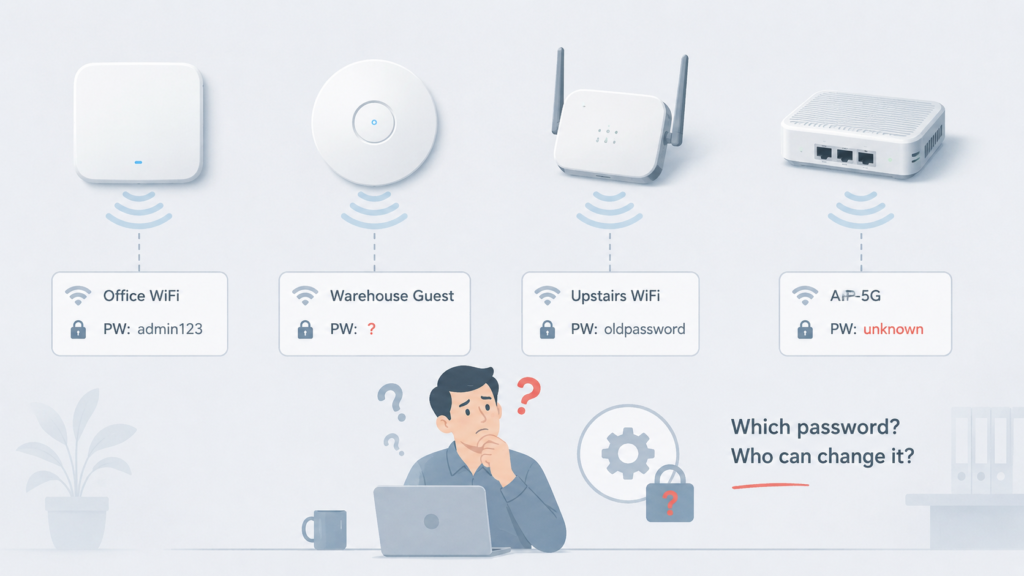
- Devices don’t switch properly between areas
- Separate passwords and settings
- Poor roaming between areas
- Nobody really knows how it all fits together
So instead of fixing the problem, you end up with a messy system that’s harder to manage and still unreliable.
Management Matters More Than You Think
A proper wireless setup isn’t just about hardware. It’s about management.
Changing your Wi-Fi password should be simple. With a properly managed system, you change it once and it updates everywhere. With a mix of devices, you need to log into each one individually, find the credentials and hope it still works.
- One place to change Wi-Fi settings
- Consistent security configuration
- Central visibility across access points
- Easier support when something goes wrong
Why Updates Are Critical
Access points are often installed and forgotten about, but they’re still computers running software.
Updates improve performance, fix bugs, add new features and address security risks. Without regular updates, businesses can end up running outdated systems without realising it.
- Performance fixes
- Security updates
- Bug fixes
- Feature improvements
It also removes reliance on individuals. Knowledge is documented, responsibilities are clear, and recovery becomes a structured process rather than guesswork.
Ultimately, it strengthens overall business resilience and increases long-term business value.

Final Thoughts
Bad Wi-Fi isn’t just annoying.
It quietly drags down your whole business.
Time wasted.
Frustration.
Workarounds.
Slower systems.
And because it “kind of works”, it never gets fixed properly. Until someone actually looks at how it’s designed.
How Affirm IT Can Support Your Business
Affirm IT takes a practical approach to fixing Wi-Fi issues in small businesses.
We start with simple questions: where does your Wi-Fi actually need to work, where are the problem areas, how many devices rely on the network day to day, and how are your access points currently installed and managed?
From there, we focus on getting the essentials right: properly placed access points, consistent equipment, secure configuration and reliable performance across the whole building.
- Map where Wi-Fi is needed
- Identify dead spots and weak areas
- Check device numbers and usage
- Review access point placement
- Standardise and securely configure the setup
If you need further advice on your networking equipment or have any other IT-related questions, don’t hesitate to get in touch with us. At Affirm IT, we specialise in providing comprehensive IT support for small businesses in Heanor, Ripley, Ilkeston, and Eastwood